
Accessibility for all
We apply common sense and work closely with experts in the industry to make sure our website is accessible to all our users. We don't rely on automated tests and where possible, we test our site with real people.
We read documents like the Web Content Accessibility Guidelines 2.0 and use them as the basis for deciding how to make content and functionality accessible to everyone. We aim to perform at the 'AA' rating of the Web Content Accessibility Guidelines and continually work to improve our performance.
As part of this commitment, we've introduced the Recite Me accessibility toolbar on our resident and corporate websites. The toolbar gives users more control over how they access content, including translation, text-to-speech, font customisation and colour contrast options. Find out more information about the toolbar.
Problems using our site?
If you do have problems using our website, please email Notting Hill Genesis and we will try and fix the issue for you.
Why accessibility matters
We feel there is a moral obligation as well as a legal one. Whether you have a visual, hearing or motor impairment, whether you're using out-of-date technology or you don't use JavaScript, we want you to be able to access the information on our site.
If you're experiencing difficulties accessing content online, you may also find the Recite Me toolbar helpful. It can be accessed via the "Recite Me" button in the website header or the green accessibility icon.
The legal bit
The Equality Act states that service providers must not discriminate against disabled people. A website is a service and is therefore covered by this law.
Translating information
The Recite Me accessibility toolbar can help residents access website content in a way that works for them. It offers translation in more than 130 languages, text-to-speech functionality, adjustable text sizes, colour contrast options and other accessibility features.
Please note that translations are automated and may not always be fully accurate. If you're unsure about any information, please contact us for support and clarification.
If you need any information from our website represented in Braille, in a larger font size, in a pictorial version, on CD (or other media) or explained in your own language, please contact your local officer.
Recite Me accessibility toolbar
We’ve added the Recite Me accessibility toolbar to our resident and corporate websites to make it easier for everyone to use.
Everyone’s needs are different, and we serve a diverse range of residents with different backgrounds, abilities and preferences. The toolbar is designed to give you simple, practical ways to access information in a way that works for you.
Whether you want to listen to content, change how it looks or read it in another language, you can choose the tools that suit you best and feel more confident using our services.
How to access the Recite Me toolbar
You can open the Recite Me accessibility toolbar in two simple ways on our website.

At the top of the page, there is a “Recite Me” option in the main header navigation. Selecting this will open the toolbar.
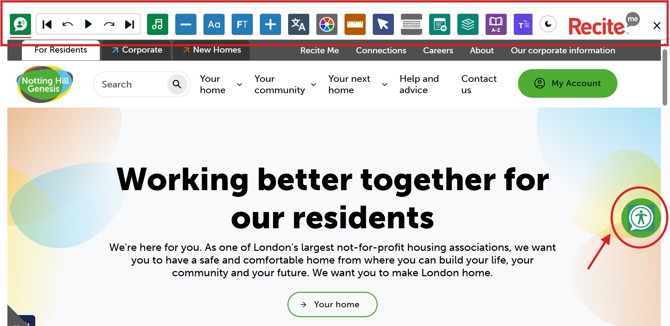
You can also access it by clicking the green accessibility icon with a person symbol, which appears on the right-hand side of the screen. This icon stays visible as you move through the site, so you can open the toolbar whenever you need it.
Both options take you to the same tool, so you can choose whichever is easiest for you.
Feature breakdown
Our accessibility toolbar offers a wide range of features to help residents personalise their experience on our website.
Below is an overview of the most popular features available and how they can support you.
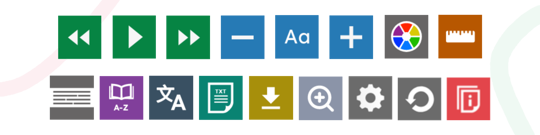
For a full breakdown of all features and how to use them, you can visit the Recite Me website
Text to speech reads the text on the page out loud. You can hear text when you hover over it when Play Automatically is selected, or press Read whole page of content to listen to everything on the page.
Movable player controls let you place the player controls where you want. You can also change the voice and reading speed.
Focus Audio, is designed to support concentration and deeper reading of digital content by introducing gentle background audio.
Designed to sit just above silence without becoming distracting, the feature aims to support neurodivergent users and people experiencing cognitive fatigue when reading longer or more complex information online.
Font Options let you adjust the website’s font, line height, and character spacing so you can find the style that works best for you. Use the + and - buttons to increase and decrease the font size.
Focus Text highlights key parts of words to make reading easier and aims to helps users with reading conditions such as dyslexia follow text more smoothly.
With over 130 supported languages, allowing a user to change the website content to their preferred language easily. Any language with a text-to-speech icon can also be read aloud when Text-to-Speech is active.
Change background and text colours of the webpage, enable dark mode for the toolbar, or view the page in Monochrome.